Law Firm Management Software for Small U.S. Firms
Run intake, matters, billing, documents, payments, and client communication from one AI-assisted legal workspace.
We confirm available workflow scope, onboarding, and any provider requirements before a firm begins rollout.
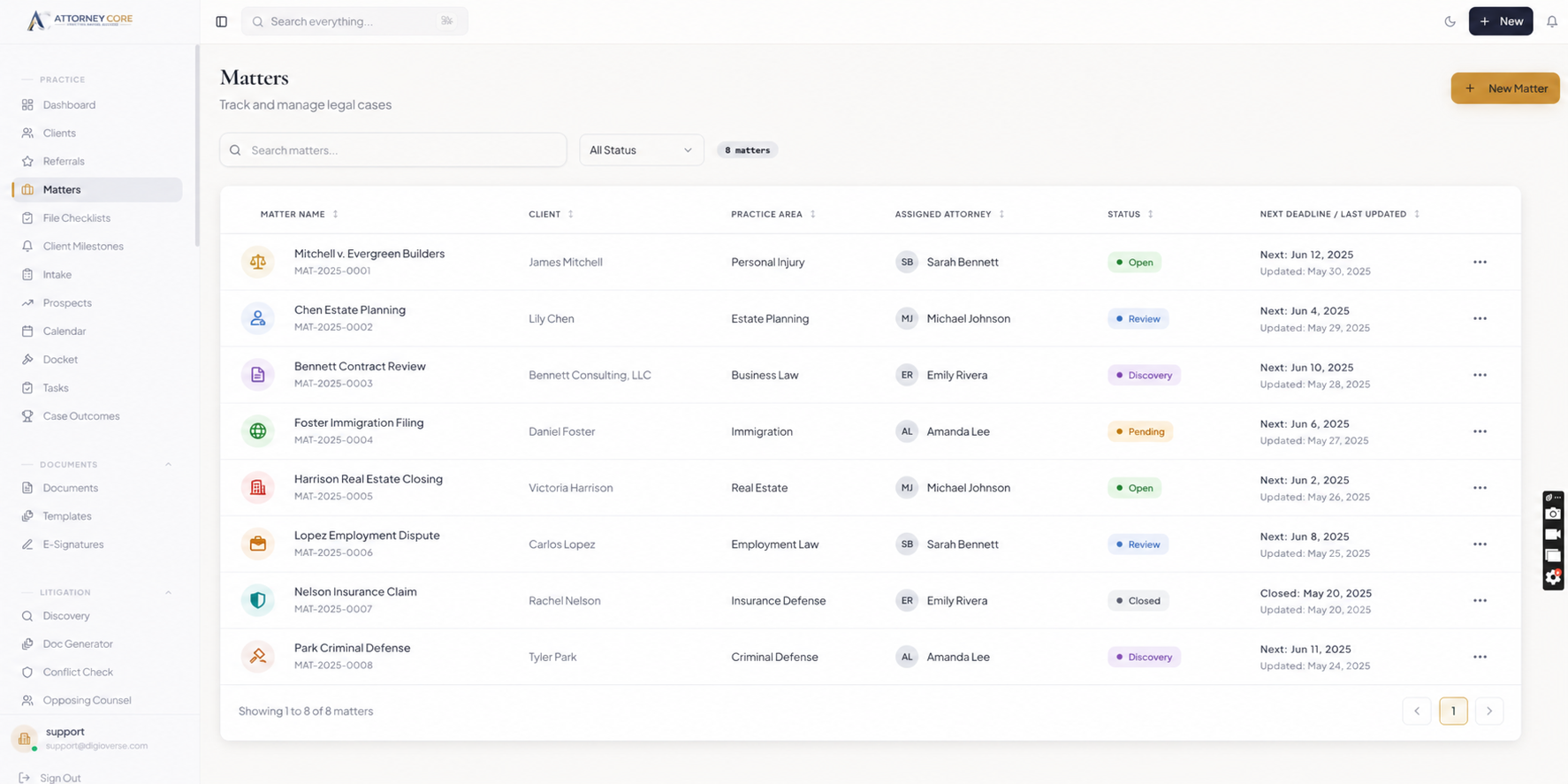
Law firm management software should give attorneys one organized place to run the business side of legal work. When intake, matters, billing, documents, reminders, and client updates live in separate tools, staff lose time and clients feel the gaps.
Attorney Core connects the full law firm workflow from the first lead to the final payment. A firm can capture a prospect, open a matter, assign tasks, upload documents, track time, create invoices, collect payments, and keep the client informed without re-entering the same information across different systems.
For small and growing U.S. law firms, that means clearer operations, easier onboarding, better billing visibility, and a client experience that feels professional from day one.
See Attorney Core in action
From first lead to final payment.
A simple walkthrough of how one matter moves through intake, AI assistance, conflict checks, documents, billing, and client updates.
Capture a new lead through intake, referral tracking, or the embedded form.
Run conflict checks and convert the prospect into a client and matter.
Assign tasks, deadlines, documents, notes, and responsible team members.
Track hourly work or add fixed-fee items directly against the matter.
Generate an invoice or payment plan and share it through the client portal.
Review revenue, deadlines, client activity, and firm health from the dashboard.
Explore the workflows relevant to your firm
Review the product areas your firm wants to evaluate in a guided walkthrough.
Matter Management
Track every case from open to close with tasks, notes, documents, timelines, and billing - all in one command center.
Legal Billing & Invoicing
Review time entries, fixed-fee items, expenses, invoices, and retainer records. Online payment processing requires a configured provider and separate verification.
Client Intake & CRM
Digital intake forms, prospect pipeline, conflict checking, and one-click client conversion with zero re-entry.
Document Management
Matter-organized storage with version control, template generation, and secure client sharing via the portal.
Trust Accounting Workflows
Separate client ledgers, transaction records, and reconciliation support for review by the firm and its accounting professionals.
Client Portal
Authenticated clients can review available case updates, shared documents, invoices, and messages.
Why firms choose one connected management system
- Replace disconnected tools for intake, matters, billing, documents, and client updates
- Keep every client, matter, invoice, document, and message tied to the right record
- Support hourly, flat-fee, retainer, contingency, and hybrid billing workflows
- Give clients a clear portal for invoices, documents, updates, and secure communication
- Help attorneys and staff see deadlines, tasks, and matter status without searching email
- Use clear pricing and a guided onboarding path so firms can move from evaluation to rollout
Launch checklist
What buyers should see before booking.
A clear intake-to-matter workflow
Real product screenshots, not abstract illustrations
Transparent pricing and guided onboarding path
Security controls stated without unsupported claims
A focused 15-minute demo option for attorneys
Trust without hype
Built for U.S. law firm operations.
Published plans start at $49/user/month · Confirm plan scope, provider requirements, and onboarding during evaluation.
Related guides
Compare the workflows buyers search for.
Explore the connected Attorney Core pages for billing, management, payments, intake, and client communication.
Law Firm Billing Software
See how Attorney Core connects time, flat fees, invoices, retainers, and payment links.
Legal Time and Billing Software
Compare hourly, fixed-fee, retainer, and trust-aware billing workflows for law firms.
Law Firm Invoice Software
Create professional invoices, payment plans, reminders, and client payment links.
Law Firm Client Intake Software
Capture website leads, run conflict checks, book consultations, and convert prospects into matters without re-entry.
Client Portal Software
Give clients secure access to invoices, documents, updates, and messages.
Law Firm Management Software
See how Attorney Core connects intake, matters, billing, documents, payments, and client communication.
Pricing
Compare Starter, Growth, AI Pro, and Enterprise pricing options for U.S. law firms.
Frequently Asked Questions
What is law firm management software?
Law firm management software is a platform that helps attorneys manage clients, matters, tasks, documents, billing, payments, reporting, and client communication from one system. Attorney Core brings those workflows together for small and growing U.S. law firms.
Is Attorney Core only for billing?
No. Billing is one important module, but Attorney Core also includes intake, CRM, matter management, documents, client portal, deadlines, reporting, security controls, and AI-assisted workflows.
How do firms move from evaluation to rollout?
Attorney Core uses a guided evaluation path so a firm can review workflows, confirm pricing, choose the right plan, and launch with the right setup.
How hard is it to migrate from another legal software platform?
For most small firms, the key is to migrate active workflows first: clients, matters, documents, billing status, deadlines, and staff ownership. Attorney Core is positioned for guided adoption rather than a long enterprise rollout.
Does it include trust accounting?
Starter includes core billing records. Growth and higher plans add trust and retainer tracking. These tools assist reconciliation but do not constitute legal, accounting, or compliance advice.
Does client intake flow into the matter without duplicate entry?
Yes. Attorney Core is designed so structured intake data can support conflict checks, client conversion, matter setup, and follow-up workflows without forcing staff to retype the same facts across different tools.
Can clients access their cases?
The client portal supports authorized access to shared case information. Confirm available documents, updates, billing views, communication, and any provider-dependent payments in the proposed plan and deployment.
Is it available as a desktop app?
Yes. Attorney Core runs in any web browser and is also available as a Windows desktop app for attorneys who prefer desktop software.