Legal Software for Personal Injury Law Firms
Track leads, matters, medical records, documents, deadlines, settlement activity, client updates, and firm revenue from one platform.
We confirm available workflow scope, onboarding, and any provider requirements before a firm begins rollout.
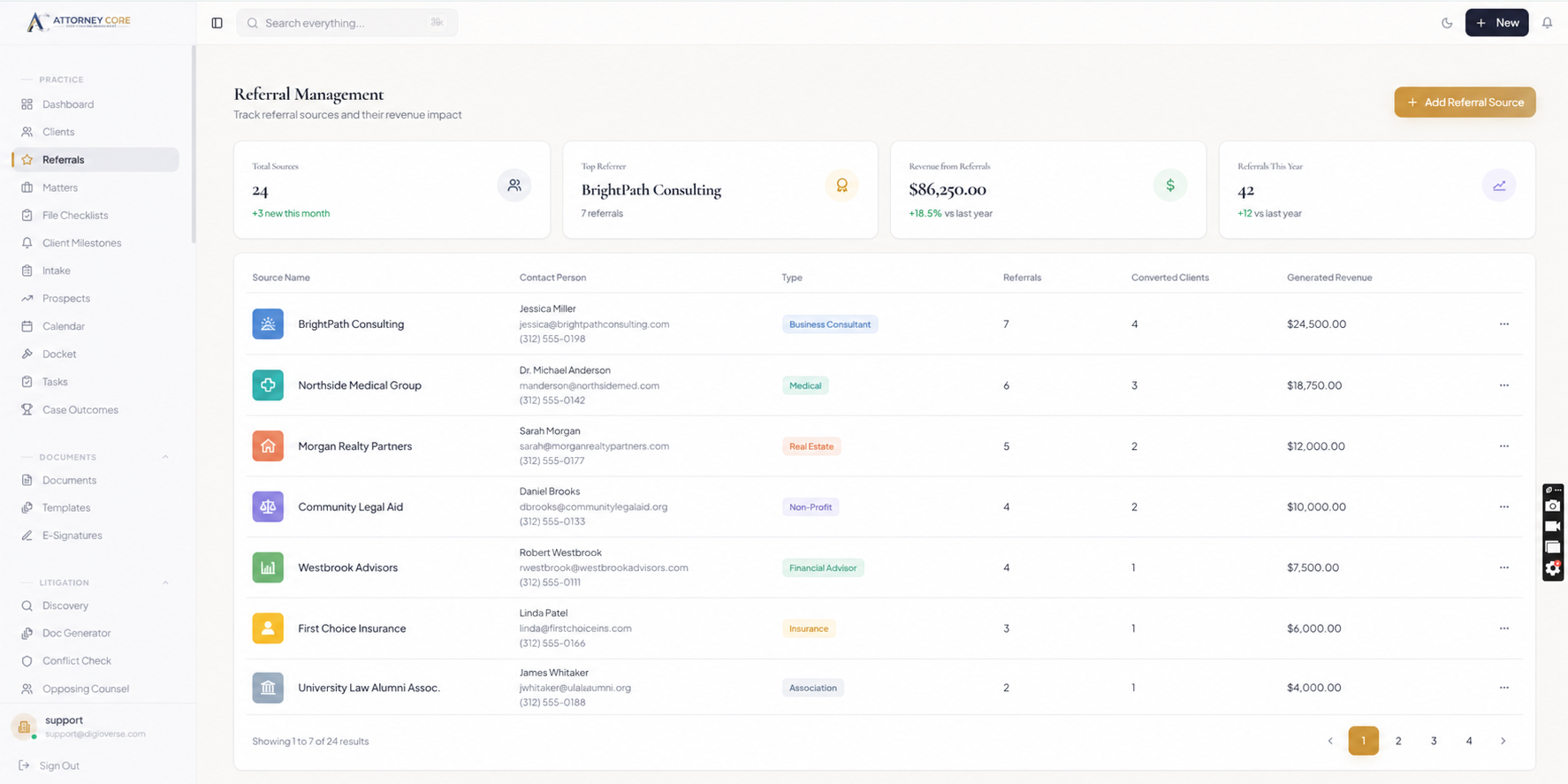
Personal injury firms need speed at intake and discipline throughout the case lifecycle. Leads must be captured quickly, evidence and medical records must stay organized, and clients need updates without constant phone calls.
Attorney Core helps PI firms connect intake tracking, referral source ROI, case stages, medical records, demand letter drafting, settlement tracking, SMS updates, attorney tasks, matter timelines, and revenue by case or source.
The result is a cleaner operating rhythm for firms handling high volumes of prospects, active matters, documents, settlement work, and client communication.
Evaluate personal injury case management using a fictional claim
Personal injury software should make the case chronology, record requests, expenses, and staff handoffs understandable. Walk through a fictional claim from initial inquiry to closing. Keep medical and settlement facts distinct from a software-generated estimate, and ask the responsible attorney to review every legal assumption.
1. Review the inquiry and representation decision
Review owner: Intake staff and responsible attorney
Evidence to check: Contact source, incident information, parties, conflict review, and follow-up ownership remain traceable.
2. Organize the record request process
Review owner: Case manager
Evidence to check: Providers, requested records, received files, missing items, and next follow-up are distinguishable for the correct matter.
3. Review case milestones and deadlines
Review owner: Responsible attorney
Evidence to check: The chronology and important dates are checked against source records and jurisdiction-specific requirements.
4. Prepare negotiation materials for review
Review owner: Attorney and paralegal
Evidence to check: The team can locate supporting documents and expenses and review any draft before sending it.
5. Check settlement and closing assumptions
Review owner: Attorney and accounting reviewer
Evidence to check: Gross amount, fees, costs, liens, and proposed client net are distinguished and independently verified before disbursement.
Questions to bring to your software demonstration
- Can the team identify missing records and the person responsible for the next request?
- Are medical records and private notes limited to authorized users?
- Does a settlement scenario preserve fees, costs, liens, and the reviewed assumptions?
- Which messages or provider integrations need separate setup, consent, and delivery verification?
Use fictional clients during evaluation. Attorneys remain responsible for legal decisions, deadline verification, and review of client communications; accounting and trust processes require the firm’s own review.
Use the free law firm software requirements checklist to record what your team has actually demonstrated.
See Attorney Core in action
From first lead to final payment.
A simple walkthrough of how one matter moves through intake, AI assistance, conflict checks, documents, billing, and client updates.
New lead comes through the embedded intake form
AI summarizes the intake and highlights missing facts
Conflict check starts before the consultation
Consultation is booked and tracked on the firm calendar
Matter is created automatically after the lead is qualified
Documents are uploaded, shared, and prepared for signature
Invoice or payment plan is generated from the matter
Client receives a portal, SMS, or communication update
Firm dashboard shows revenue, deadlines, workload, and next steps
Explore the workflows relevant to your firm
Review the product areas your firm wants to evaluate in a guided walkthrough.
Intake Tracking
Track every inquiry, consultation, qualification status, and source before the lead becomes a retained client.
Referral Source ROI
See which referral partners and campaigns create qualified cases, retained matters, and revenue.
Case Stages
Move PI matters through intake, treatment, records, demand, negotiation, litigation, settlement, and closeout.
Medical Records & Documents
Keep requests, received records, lien notes, discovery, photos, and demand packages organized by matter.
Demand Letter Drafting
Use AI-assisted drafting and matter summaries to prepare client updates, demand drafts, and case narratives faster.
SMS and Portal Updates
Keep clients informed with matter-based communication history, portal updates, and SMS reminder workflows.
Built for PI Workflow Visibility
- Capture and qualify leads through structured intake
- Track referral source ROI and revenue by case source
- Organize medical records, discovery files, and matter documents
- Track deadlines, attorney tasks, case stages, and settlement preparation
- Draft demand letters and client updates with AI-assisted workflows
- Monitor revenue, invoices, expenses, settlement activity, and profitability
Launch checklist
What buyers should see before booking.
A clear intake-to-matter workflow
Real product screenshots, not abstract illustrations
Transparent pricing and guided onboarding path
Security controls stated without unsupported claims
A focused 15-minute demo option for attorneys
Trust without hype
Built for U.S. law firm operations.
Published plans start at $49/user/month · Confirm plan scope, provider requirements, and onboarding during evaluation.
Related guides
Compare the workflows buyers search for.
Explore the connected Attorney Core pages for billing, management, payments, intake, and client communication.
Corporate Law Software
Entity management, deal matters, contract lifecycles, and governance workflows.
Real Estate Law Software
Property closings, title reviews, contract contingencies, and escrow accounting.
Bankruptcy Law Software
Chapter 7 & 13 matters, creditor communications, and fee payment plans.
Employment Law Software
Wage-and-hour claims, EEOC filing deadlines, witness notes, and case billing.
IOLTA Trust Accounting
Client trust ledgers with overdraft blocking and a reconciliation worksheet.
Immigration Law Software
Organize forms, document collection, deadlines, matters, and client communication.
Family Law Software
Manage intake, matter notes, documents, billing, deadlines, and secure communication.
Criminal Defense Software
Case tracking, court appearances, docket deadlines, and client communication.
Estate Planning Software
Document automation, wills, trusts, probate cases, and client intake.
Software for Solo Attorneys
Explore intake, matters, billing, deadlines, and client service for solo practices.
Law Firm Management Software
See the complete intake-to-payment workflow for small U.S. law firms.
Frequently Asked Questions
Can Attorney Core support a small law firm without an IT team?
Yes. Attorney Core is designed for small U.S. firms that need practical setup, guided onboarding, license-based access, and workflows that do not require a dedicated IT department.
Does Attorney Core include billing and client portal tools?
Yes. Attorney Core includes matter-connected billing, invoice workflows, payment plans, document sharing, client portal access, and secure client communication tools.
How difficult is it to switch from another legal software platform?
For most small firms, the cleanest switch focuses on active matters, documents, billing status, deadlines, and staff training first. Attorney Core fits firms that want a guided move away from tool sprawl rather than a heavy enterprise migration.
Can intake details move into the matter without retyping everything?
Yes. Attorney Core is designed around a connected intake-to-matter workflow so firms can collect structured lead details, qualify the opportunity, and carry those facts into the client and matter record with less duplicate entry.
Is Attorney Core only for one practice area?
No. Attorney Core is configurable for multiple practice areas, including immigration, personal injury, family law, criminal defense, solo practice, and general small-firm workflows.